
Forestville NSW Australia tel 0410 532 923 email toivo@totaldata.biz
The application was developed using PHP and MySQL in RedHat 9 and Fedora server environments to replace an Access database used for recording timesheets and producing billing details and summaries by client at the end of the month. The documentation and the source code is now available for learning how to create an interactive database driven web application.
The browser based PHP application produces standard XHTML code. The application uses a simple MySQL database. The emphasis is on the word simple, admittedly at the expense of the move advanced database design principles. Once you master the navigation through a database table, the creation of dropdown lists from lookup tables and how to control the program flow based on the button selections on a form, you can graduate into foreign keys, the third normal form, concurrency and other intricacies of the database design.
Please note that this application needs to be tucked away safely on a server in an intranet, and used by one concurrent user. The login authentication is not part of the current release and referential integrity features have not been used in the design either.
The installation instructions show how to set up the schema by using MySQL Administrator, thus avoiding the use of the command line interface.
The source code is licensed under the GNU General Public Licence (GPL), and the subroutines and collections of functions are licensed under GNU Lesser General Public Licence (LGPL). The documentation is licensed under GNU Free Documentation License (GFDL).
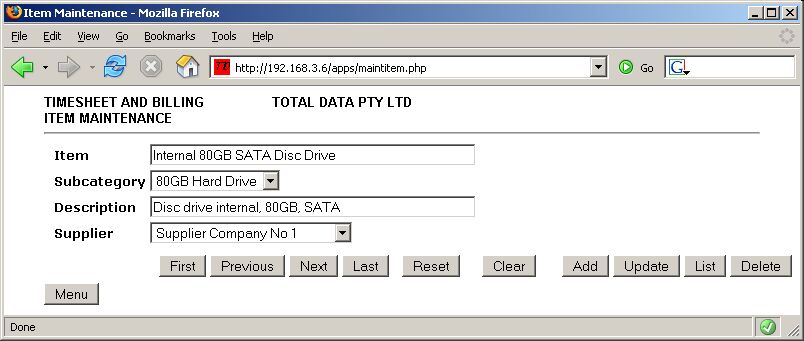
A sample screen snapshot at the bottom of this page shows the form from the maintitem.php module with the control buttons which allow the user to navigate the item table, add items, delete items and list the table.
The subroutine libraries include functions rendering the key elements of the input form, catering for input validation and displaying error messages.
The design objective of the modules was to make the source code easy to understand and simple to modify. The subroutines use procedural call structure. Javascript is not used.
The software modules have been tested using PHP 5.0.4 and MySQL 5.0.16.
The HTML code has been checked to be valid XHTML 1.1 using the tools available at W3C Markup Validation Service. Cascading Stylesheets are used to fine tune the elements of the screen.
The application uses two stylesheets, one for screen elements (style.css) and one for printing (stylep.css).
The basic MySQL functions used by the application modules are stored in their own module submysql.php. The functions include the setup of a database connection. Because the connection returned from the function is used as an input parameter to the MySQL query function, the same connection is available throughout the session, during each pass of an individual module. The source code of submysql.php is part of the download and it is also documented here.
The time and date functions validate the contents of the date and time fields input through the forms. Date comparison functions are also included. See subtimedate.php for a description of the available functions.
The display functions incorporate the main elements of the top part of each form, including the name of the application, the company name and the name of the current module. The buttons like Menu and Reset are generated by calling separate functions.
The purpose of the configuration functions is to make it easy to adapt the application to different date formats. The modules support the formats dd/mm/yyyy, mm/dd/yyyy and yyyy/mm/dd. The date separator character can be set independently of the format chosen.
The following instructions assume that you have a working MySQL database server running under Fedora or some other Linux distribution, and that you use a Window PC for accessing the MySQL Server. If you use the Linux server itself in graphical mode, or a Linux desktop workstation for these functions, adapt the instructions accordingly.
The instructions also assume that you have the Administrator rights in your MySQL server. This is part of the installation of MySQL server.
1. Download the MySQL Administrator utility from MySQL AB's website and install it on your workstation.
2. Create a dedicated directory in the hard drive of your workstation for storing backups of your test database.
3. Run MySQL Administrator
4. Save the file MaintItem.sql on the hard drive of your local workstation. This file contains the SQL statements necessary to create the database tables. MaintItem.sql is a text file and the MySQL Administrator reads it and interprets its SQL commands, creating the tables and even the database itself for you.
5. Open MySQL Administrator and select Restore from the left hand pane. Under the 'General' tab, go to 'File to restore' and locate the file MaintItem.sql. Leave the selection under 'Target Schema' as the default 'Original Schema'. There is no need to tick 'Create database(s) if they don't exist'. If you decide to rename the database, you need to modify the name of the database in the PHP source code and in the configuration table. Click 'Start to restore'.
6. After the restore has finished, the name of the database 'billing' will appear in the left pane under Schemata. Select 'billing' and the tables created by the restore will appear on the right hand side under 'Schema Tables'. The following tables are created:
At this stage only the config table has one row of data. You can inspect the contents of the table by right clicking its name and selecting 'Edit Table Data'. Selecting 'Edit Table' will show you the design of the table.
1. Click 'User Administration' in the left pane of MySQL Administrator. Under the tab 'User Information', click 'New User'.
2. Enter 'sqluser' into the MySQL User field in Login Information.
3. Type in 'sssqql' into Password and 'Confirm Password' and click 'Apply changes'.
4. Alternatively, you can set up your own username and password, but then you will need to modify the username and password in the module mysql.php.
5. Select the tab 'Schema Privileges' and then select 'billing' under Schemata.
6. The available privileges are on the right hand side. Click << to move them to the column 'Assigned Privileges'. Click 'Apply changes'.
This operation has given our user the necessary access rights to the database 'billing'. We have only one user who has full rights to each table of the database. At this stage, in our simple approach, there is no need to have several users with individual access rights to the tables or different security levels regarding the fields of each table.
The module allows the user to maintain the Item table, using the Item Maintenance form shown below. The following transactions are available: add an item, update an item, delete an item and list all the items. The following buttons can be used to navigate through the item table: First, Previous, Next, Last. The Menu button takes user back to the menu.
Each item has a subcategory, which belongs to a category. Each item has a supplier. The subcategory and supplier are lookup fields on the item maintenance form. The program validates all the entries, including the date.
The flow of the program logic is controlled by a case statement. The button selected by the user leaves a status marker in the input form, which is stored into the switch of the case statement. The Maintitem.php Source Code is presented in small sections with comments on a separate page.
Right click one of the two links and select 'Save Link As...' to save the module to your local hard drive. Expand the archive.
Transfer each module to the MySQL server into the directory shown in the third column - except the first file, which is saved to a local PC directory
| Module | Purpose | Copy To Directory | ||
| MaintItem.sql | Database setup, empty tables | C:\temp\ in the local PC | ||
| submysql.php | MySQL Functions | /var/www/sub in the web server | ||
| subconfig.php | Configuration Functions | /var/www/sub in the web server | ||
| subdisplay.php | Display Functions | /var/www/sub in the web server | ||
| subtimedate.php | Time and Date Functions | /var/www/sub in the web server | ||
| stylea.css | Stylesheet for screen | /var/www/html in the web server | ||
| stylep.css | Stylesheet for printing | /var/www/html in the web server | ||
| maintitem.php | Item Maintenance | /var/www/html/apps in the web server |
The following table shows which Open Source software licences are applicable to each module.
| License Document | License Type | Modules Covered | ||
| GNU_GPL.html | GNU General Public License | maintitem.php | ||
| GNU_LGPL.html | GNU Lesser General Public License | submysql.php, subdisplay.php, | ||
| subconfig.php, subtimedate.php | ||||
| GNU_FDL.html | GNU Free Documentation License | Documentation on this webpage |
The following free tools, utilities and websites were used in developing this application in PHP and MySQL on a Windows workstation, accessing a RedHat 9, later Fedora server.


